Sale day on a Closed event
How a Glastonbury-style Closed event lets successful groups help the groups still waiting - one reveal at a time each, matched by your group's preferences, time-boxed, revocable, and audited.
Picture the Glastonbury moment. Thirty of you, five buying groups, and the event is Closed - personal details stay inside each group, because a Squad that size shouldn't be passing registration numbers around all year. Then the sale opens: your group gets through and buys its six. Another group is still stuck in the queue. You could buy for them - except their details are exactly what Closed mode hides from you.
That's the one moment the wall needs a door. TicketSquad calls it the multiple-group fallback, and here's the door, and everything that keeps it narrow:
If your group gets its tickets, you might be able to help another group get theirs on sale day - just their details, just for the day. When they get there, you move on to the next group on your list.
Everything else about sale day works as it does on any event: the tally, reporting who's covered, the undo and the rest are in the sale day guide. This page is what Closed changes.
What it looks like on the day
On an Open event every group's table is already on your sale day tab. On a Closed event you see only the groups you're in or helping, until your group gets its tickets. Then the tab grows a panel headed Next group to help, and the group you've been matched with sits under it - above your own, for as long as the reveal lasts, with the required answers, the copy buttons, and the button to report the result against their group. It appears for everyone in your group entitled to it, helpers included. Buy their tickets, report it, and the relay keeps moving. If there is no group left for you to help, the panel says that instead, so you always know where you stand.
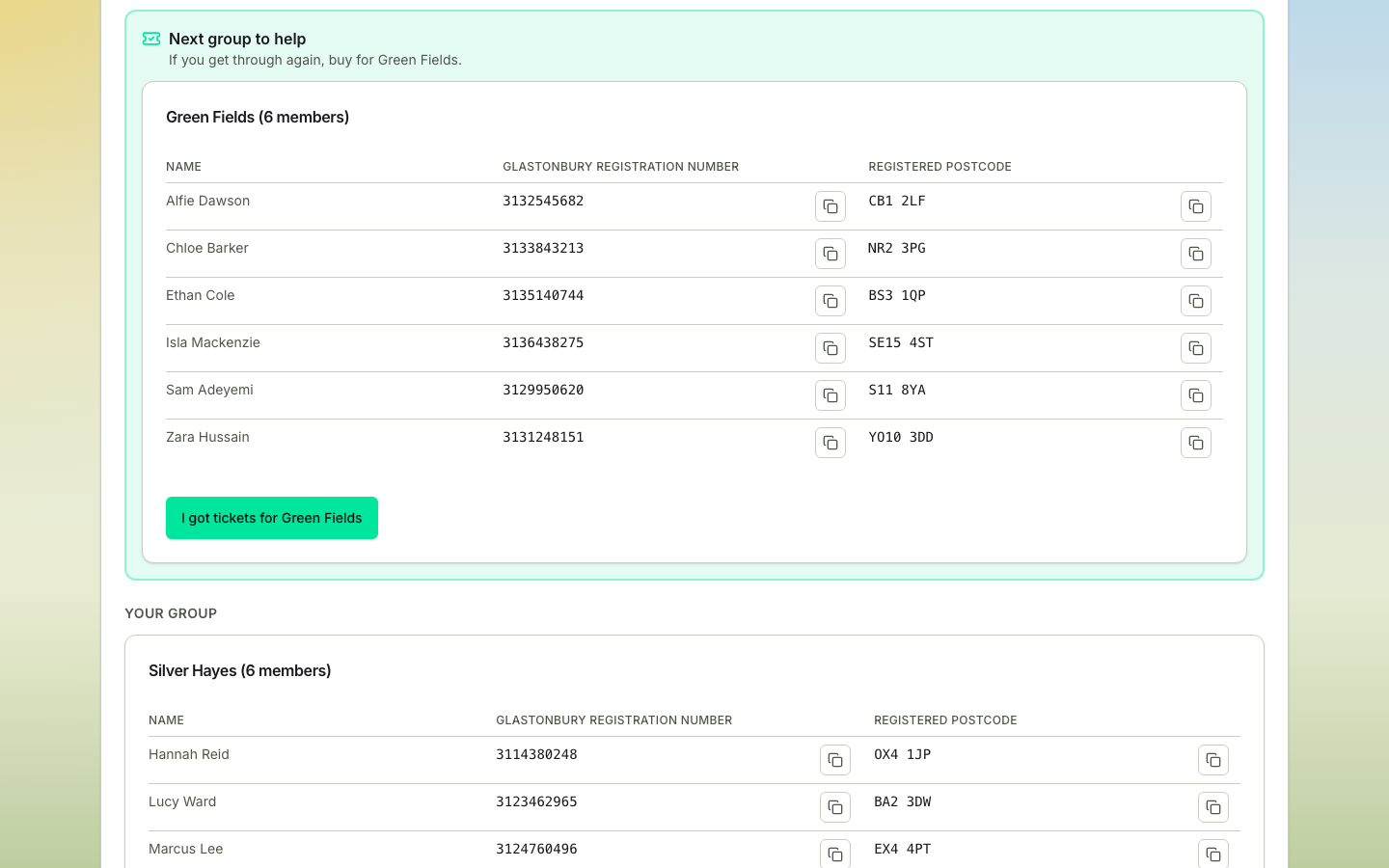
The other waiting groups stay hidden. The full board still lists every group, but the answers it fills in are only the ones you're entitled to see.
When it can happen at all
The fallback arms only when all of these hold:
- the event is effectively Closed (Open events don't need it - there's nothing hidden to reveal);
- the tickets are named (transferable events have the swap board instead);
- a sale date is set, and now is inside the sale-day window - from the sale start until 24 hours later, or until every group has its tickets, whichever comes first. On an event with sale plans that's the running sale's date and window, and the groups matched are that sale's. A group recorded as having missed out hasn't got there yet, so it keeps the window open: there's still someone to help. A coordinator can extend the window when a sale runs long. (Closing the window stops new matches; a reveal already granted runs to its own expiry or revocation.)
How you're matched
The moment your group reports success, TicketSquad matches you with one waiting group - when an eligible one exists (a group with no active members, or that has blocked yours, isn't eligible) - and your group gets access to that group's sale-day sheet.
You are matched with one group at a time, but a waiting group can have several groups helping it at once. If five groups all put group one at the top of their list, all five go after group one - that is the point of a help-first list, and it is what a Squad in a queue actually wants. Nobody is bumped down the list because someone else got there first.
How the target is picked, in order: any group that has blocked yours is off the table entirely; then your group's help-first list, in the order you set it; otherwise the group that needs it most - fewest tickets already secured, then the fewest groups already helping it, then the smallest, then the one that formed earliest. A group that hasn't got its tickets still counts as waiting for matching, whoever has recorded that and however; only a recorded success takes a group out of the running. And when you buy for a group already down as having missed out, recording that success simply replaces it - nobody has to clear anything for you first.
When the group you're helping gets there first, their reveal ends the instant they report success - and every group that was helping them is matched again straight away, each to the next group on its own list. That happens in the same moment as the report, so there is no gap to notice. If you'd already started copying their details, the tab tells you before it moves you on, the same warning any event gives. If nobody is left waiting, your card says so rather than quietly disappearing.
Choosing who you help: reveal preferences
Ahead of the sale, a coordinator or the group's admin can set its sale-day reveal preferences from the group's menu on the Groups page:
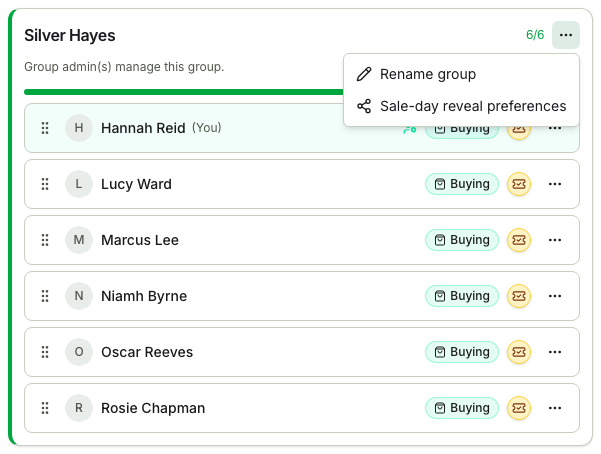
- Help these groups first - a friendly ordering: who you'd rather help, if they're still waiting.
- Block groups from this group's data - a hard veto in the other direction: groups that must never see your group's details, even if they offer to help.
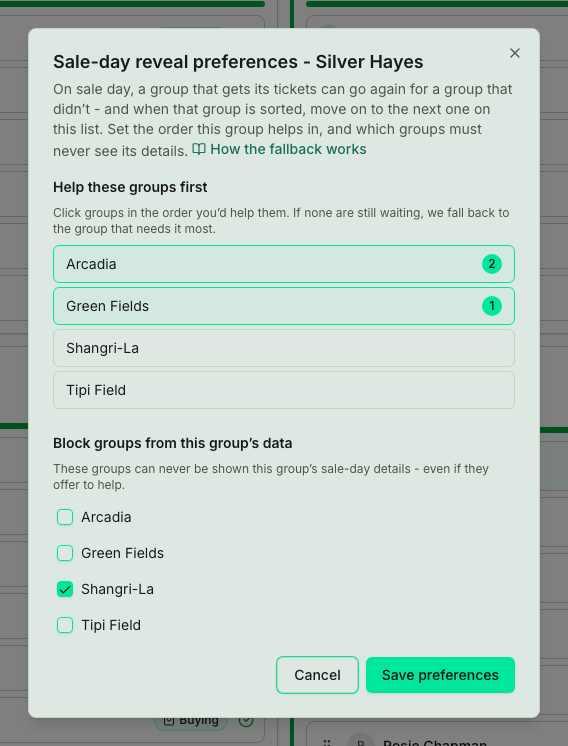
Your priority list says who you'd rather help; your block list says who must never see you. The app won't let one group be on both lists. Both only steer the reveal, so they matter on a Closed event; on an Open event the next group to help is simply the earliest-formed group still waiting.
The email
The match also arrives by email, in the message that tells your group it got its tickets. That is deliberately one email rather than two: the match and the good news are minutes apart and go to the same people, and sale day is a bad day to send anybody a second message about the same thing. Everyone in the group gets the link, whether or not they ended up with a ticket themselves - missing out this time doesn't stop you buying for someone else. If your match later changes, the first change arrives as its own short email, because your group's good news has already been and gone - it says your match has changed and names the group, rather than repeating the news. That is the only email you get about a change: if your match moves again during the same sale, the new group simply appears on your sale day tab and in the app.
The email carries only a link, never the details themselves, so turning access off actually turns the link off - the link is worked out as the message is written, so a grant revoked in between simply isn't in it. It's also the only way in that opens the sheet as its own printable page: Open the sale-day sheet leads to the same data as a standalone board, which is what you want if you would rather have it in a second window while you queue.
The leash
- Time-boxed - every grant carries its own expiry, set from the window when it's made; it's built for a day, not a season.
- Scope-pinned - the helping group sees that one group's sale-day sheet, and never anyone's account email.
- Revoked the instant it's moot - the target group gets its own tickets? The link stops working immediately. The helper withdraws their success report? Same. The coordinator marks the sale over? Every live reveal on the event goes at once, rather than being left to run out its expiry - the same event can hold another sale later with different people in the groups, and last time's access has no business surviving into it. On an event with sale plans, ending any sale switches off every live reveal on the event. Two honest limits. A sheet someone already saved or printed is paper, and can't be recalled. And revoking stops every new read of the data, but it can't reach into a page somebody already has open - that one catches up when they reload.
- Audited - grants, the sheets they render, reveal emails (logged once delivery succeeds), extensions, and revocations are all recorded, and a live grant traces back to the reported success that caused it (withdrawing the report clears that link as part of the revoke).
For coordinators
The coordinator's sale day tab lists each live reveal as "helper group → waiting group", with controls to extend it or turn it off - one line per reveal, so a group with three groups helping it shows three. The panel shows only group names, never the details themselves, and on an event with sale plans it's event-wide.
Nothing about this weakens the rest of Closed mode: outside this window, across every other surface, the wall holds.
Sale day
Readiness, the live board everyone buys from, helping the next group, the offline backup files, reporting outcomes, and what happens for anyone still without a ticket.
Communities
One trusted circle across many events - create it once, and the crew flows from sale to sale without invite-link juggling.